
Report library

Missing Sales Days report

Use this report to decide whom to call before circulating the shopping centre’s morning trading figure. Each row identifies a shop and shop type, the missing date and the missing-days count. The date gives operations a specific file to request. The count helps identify a shop with a recurring gap that needs investigation with its reporting contact.

Read a row against the store calendar

A shop missing yesterday’s figure may have had an approved closure. Check the tenant’s trading obligation for that date before sending a reminder. When several stores show a gap on the same day, ask the integration team whether they share a POS provider or transfer schedule. When one shop appears on several dates, give the tenant contact the exact dates together.

A missing row establishes that the expected sales evidence needs checking. Confirm whether it traded and whether it declared zero sales. Zero Sales Days has a separate purpose. Add the cut-off to the list you take into the meeting so later replies can be reconciled with the morning view.

Read the guide to missing and zero sales · See Missing Sales Days in a demo
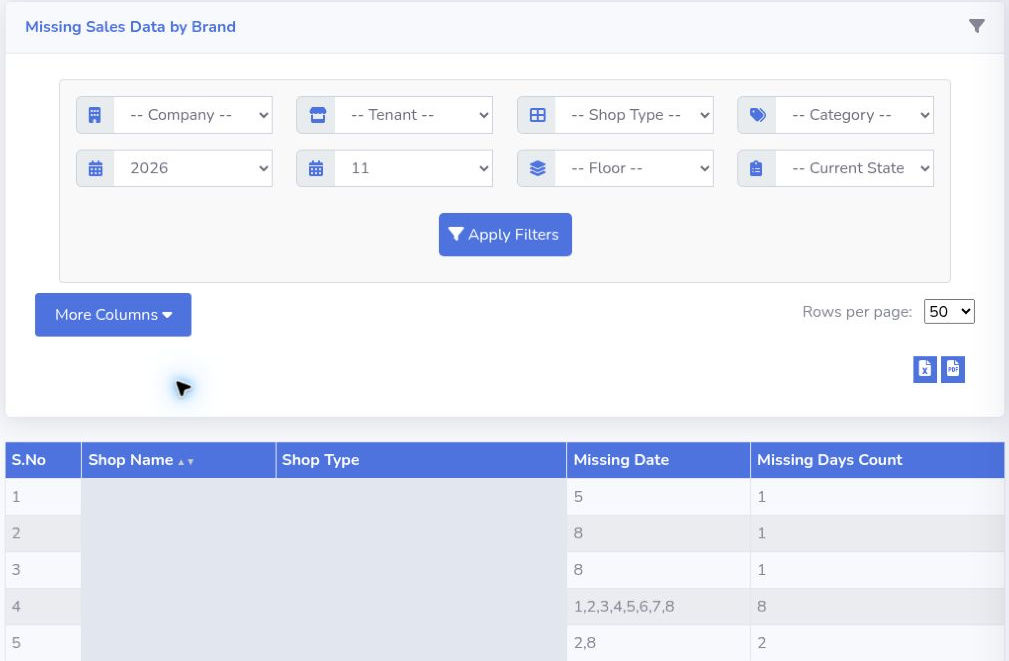
A filtered missing-sales report shows five rows, including counts of one, two and eight missing dates. Shop names and shop types are concealed.
Missing Sales Data by Brand Use the missing dates and day counts to direct follow-up. Five anonymised demo rows show how a single absent day and a run of eight days appear in the report.
Product walkthrough

Bring one mall.
Follow one trading day.

See how tenant submissions become a finance review and a management brief.

Book a demo
Product screen

Open full resolution ↗
Book a demo

Mall Metrics advisor

ADSR product support and demo enquiries

What would you like to know about Mall Metrics?
Book a demo

Fundle stores this conversation so the team can follow up.