 Mall Metrics
Set the trading day
Use the tenant register, open dates and closures to define which submissions are due. Agree the local cut-off for stores that trade past midnight.

A mall can have a sales total by 9 a.m. and still have no reliable answer to “How did we trade?” Automated Daily Sales Reporting makes the reporting cut-off, the missing stores and the sources behind the total visible.
If last Monday includes all 120 stores and this Monday includes 116, a drop in reported sales can come from the four missing files. Comparing the same 116 stores answers a different question about trading.
| Measure | At cut-off | How to read it |
|---|---|---|
| Stores due to report | 120 | Stores expected to report on this trading date. |
| Reports received | 116 | Includes three stores that explicitly declared zero sales. |
| Reports outstanding | 4 | Their sales are unknown. Tenant relations follows up. |
| Reporting coverage | 96.7% | 116 received ÷ 120 due. Carry this figure into the morning review. |
Use the tenant register, open dates and closures to define which submissions are due. Agree the local cut-off for stores that trade past midnight.
Map each outlet to its POS feed, file or declaration. Keep returns, gross and net sales on agreed definitions so the figures can be compared.
Separate a late submission from a confirmed zero, and a corrected close from a duplicate. Give each follow-up a tenant, a period and a source.
Compare the daily total with the monthly declaration and certified statement. Review the evidence and lease terms before finance approves a sales base.
Missing Sales Days lists both the missing trading date and the number of outstanding days. A tenant can owe more than one submission.
View the report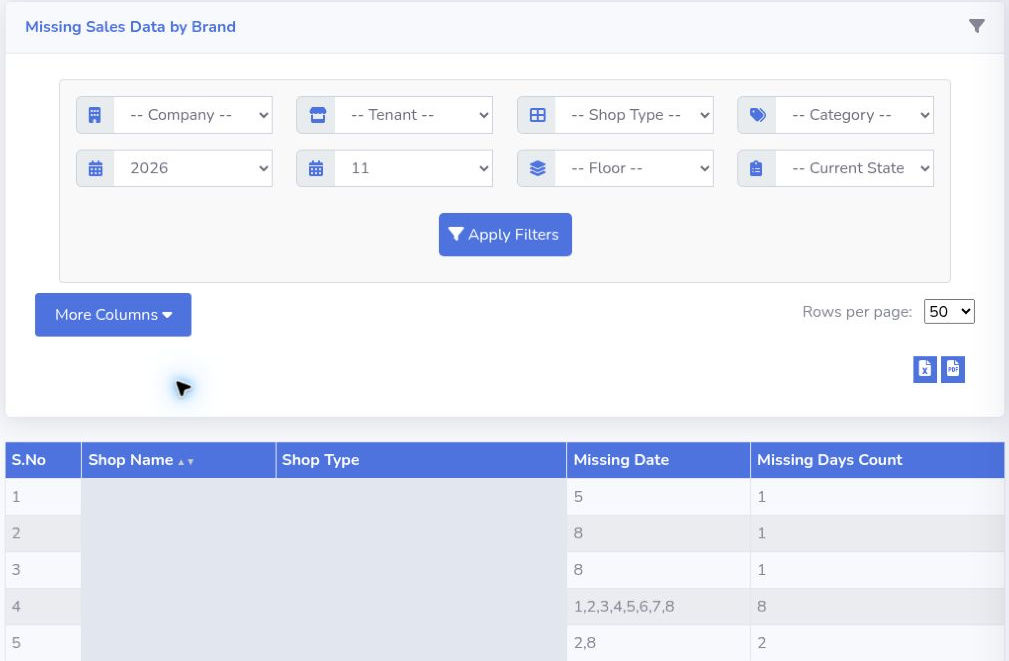
See how tenant submissions become a finance review and a management brief.